


Quick Overview: How to Prevent Musculoskeletal Disorders in the Workplace
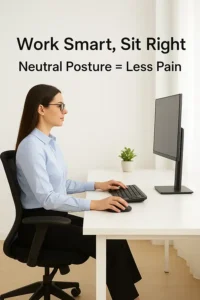 Musculoskeletal disorders (MSDs) are among the most common workplace injuries, often caused by repetitive movements, awkward postures, and poor workstation setups. The good news? They’re largely preventable.
- Maintain neutral wrist and arm positions while typing and using a mouse
- Adjust your workstation to fit your body, not the other way around
- Use ergonomic keyboards, mice, and chairs to reduce physical strain
- Take frequent breaks to stretch and move throughout the day
- Watch for early warning signs like stiffness, tingling, or fatigue
With consistent ergonomic habits, you can prevent discomfort and protect your body from long-term strain.
Simple Ergonomic Habits to Prevent Musculoskeletal Disorders
Musculoskeletal disorders (MSDs) affect the muscles, nerves, tendons, ligaments, and joints — and they’re increasingly common among office workers. Sitting for long hours, typing in awkward positions, or using an ill-fitted mouse can all contribute to gradual strain. Over time, these habits can lead to conditions like carpal tunnel syndrome, tendonitis, or chronic neck and back pain. The key to prevention lies in daily awareness and small ergonomic improvements that protect your body before discomfort becomes pain.
Understanding Musculoskeletal Disorders
MSDs develop slowly, often from repetitive motions and prolonged poor posture. They typically affect areas like the neck, shoulders, wrists, and lower back. For many people, symptoms start as mild tension or stiffness but can progress into persistent discomfort or even injury. According to the Centers for Disease Control and Prevention (CDC), MSDs are one of the leading causes of lost work time and decreased productivity. By identifying risk factors early and making ergonomic adjustments, you can significantly reduce your risk. The World Health Organization (WHO) also emphasizes that early ergonomic intervention can help prevent chronic pain and long-term musculoskeletal strain.
The Role of Ergonomics in Prevention
Ergonomics is all about designing your workspace around your body’s natural posture and movement. Poorly arranged workstations force muscles and joints to work harder than necessary, leading to strain. By contrast, a well-designed ergonomic setup promotes balance, alignment, and comfort throughout the day. Using the right ergonomic keyboards and ergonomic mice helps distribute effort evenly across your hands and arms, minimizing repetitive stress. Ergonomics isn’t just for those already experiencing pain — it’s the foundation for long-term health and efficiency.
Setting Up an Ergonomic Workstation
Your workstation should fit you — not the other way around. Start by positioning your monitor so that the top of the screen is at or slightly below eye level. Keep your elbows at a 90-degree angle and your feet flat on the floor. Your mouse and keyboard should be close enough that you can work without stretching your arms forward. If you’re not sure where to start, this guide on how to adjust an ergonomic keyboard walks through positioning and angle adjustments that help align wrists naturally. Even small changes, like raising your chair or using a monitor riser, can prevent tension from building up in your neck and shoulders. If you begin to notice hand or wrist strain, review these ergonomic risk factors to understand what might be contributing to your discomfort.
Healthy Habits That Reduce Risk
 Ergonomics is only part of the equation — movement is equally important. Try standing up or walking for a few minutes every 30 to 45 minutes. These short breaks increase blood flow and reduce stiffness. Stretch your wrists, roll your shoulders, and gently twist your torso to keep muscles flexible. The Mayo Clinic emphasizes that alternating between sitting and standing helps prevent lower-back fatigue and supports better posture. You can also set reminders or use sit-stand desks to encourage regular movement throughout the day.
Recognizing Early Warning Signs
Pain is the body’s way of signaling that something’s wrong. Common early symptoms of musculoskeletal strain include tingling, numbness, or stiffness in the hands, wrists, and neck. Many people ignore these warning signs until the pain becomes persistent, but addressing them early can prevent long-term injury. If you start to feel discomfort while typing or using your mouse, adjust your setup immediately. The 7 ergonomic keyboard benefits article explains how supportive tools can help relieve early strain before it develops into something more serious.
The Importance of Proper Posture
Maintaining proper posture sounds simple, but it’s often overlooked. Slouching or leaning forward strains the spine and neck, while resting your wrists on the desk while typing can compress nerves. The solution lies in keeping a neutral body position: shoulders relaxed, elbows at your sides, and wrists straight. If you spend most of your day typing, review this guide on proper typing posture to make sure your hands, wrists, and arms are properly aligned. A neutral posture reduces tension and helps your body move more efficiently throughout the day.
Equipment Upgrades That Make a Difference
Sometimes, discomfort persists even after adjusting posture — that’s when it may be time to upgrade your equipment. Modern ergonomic tools are designed to minimize stress on your hands and arms. For example, a split keyboard encourages natural hand spacing, while a vertical mouse aligns your wrist in a more relaxed, handshake position. These simple upgrades can have a huge impact on how your body feels at the end of the day. If you’re curious about how ergonomic design helps prevent strain, explore Goldtouch’s ergonomic mice collection for designs that support healthy hand posture.
Preventing MSDs Through Movement and Awareness
No matter how perfect your setup is, the human body isn’t meant to stay still for hours. Regular micro-movements — adjusting your posture, stretching, or simply walking to refill your water — keep your muscles active and circulation flowing. Awareness plays an equally important role; check in with your body throughout the day to notice tension early. Small corrections, like relaxing your shoulders or adjusting your seat height, can make a big difference over time. The Occupational Safety and Health Administration (OSHA) recommends combining proper workstation design with regular activity to effectively prevent MSDs.
Creating a Long-Term Prevention Plan
Preventing musculoskeletal disorders isn’t about one big change — it’s about consistency. Take a few minutes each week to evaluate how your workspace feels. Is your chair still supportive? Are you leaning forward or twisting often? Periodic check-ins help catch bad habits before they lead to discomfort. Document any recurring tension or soreness, then adjust your setup or tools as needed. Combining ergonomic awareness with healthy movement habits creates a sustainable prevention plan that protects your body for years to come.
Conclusion
Musculoskeletal disorders don’t appear overnight — they develop quietly through repetitive stress, poor posture, and inactivity. But the good news is they’re entirely preventable. By investing in ergonomic tools, adjusting your workstation, and staying aware of your body’s signals, you can avoid pain and stay productive. Prevention is always easier than recovery, and small changes today will lead to big improvements in how you feel tomorrow. Goldtouch’s ergonomic solutions are designed to help you work comfortably and safely, one keystroke at a time.


