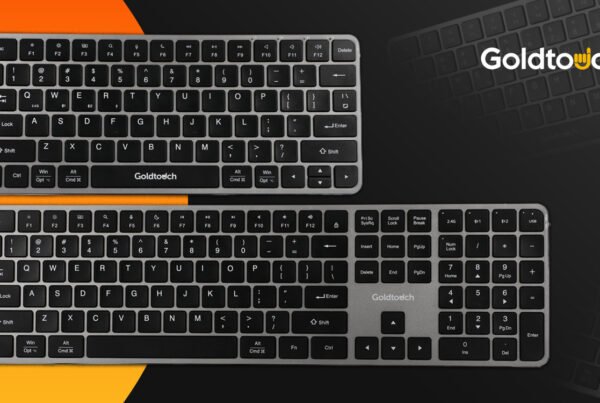
Tired of using a keyboard that feels like it’s fighting against your fingers? Ever dream of a typing experience that’s as comfortable as it is efficient? Most keyboard innovations often amount to little more than fancy backlighting or a new shortcut key, the Goldtouch Elite Adjustable Keyboard, however, promises something different: a fundamental rethinking of typing comfort and efficiency.
But in a market saturated with ergonomic options, what truly sets the Elite apart? To answer this question, we turned to Dani Kollin, an award-winning science fiction author and advertising copywriter, tech enthusiast, and long-time Mac user, who had the opportunity to test the Elite in its early stages. As one of the first to experience this new design, Dani’s insights offer a unique perspective on whether the Elite lives up to its ambitious claims.
From its adjustable design to its customizable layout, the Elite aims to be more than just another keyboard—it aspires to be your new favorite workspace companion. But does it succeed? Let’s dive into Dani’s hands-on experience and explore how the Goldtouch Elite raises the bar for ergonomic keyboards, potentially transforming how we interact with one of our most-used devices.
A Sleek Evolution in Ergonomic Keyboard Design
Review of the Goldtouch Elite Adjustable Keyboard by Dani Kollin:
“When Goldtouch told me they had a new keyboard coming out and asked if I’d like to give it a go, I thought, “Sure, why not?” I expected some incremental improvements, not a wholesale evolution of the product. So glad to report I was wrong. One caveat: I’m a Mac user, so some of this will be only relevant to that cohort. Let’s get started.
The new form has a lower profile, is lighter, and now comes with only one lever for both height and splay, making it easier to manipulate. The keys not only present more surface area for your fingertips but also feel great (think of a moonbounce for your fingers). The actuation force (press), key travel (distance from press to base), and tactile feedback (does it have a fidget spinner-like vibe where you just wanna keep pressing?) have all been improved upon.
If you’re a Mac user, make sure to keep the Function key (FN) always on to take advantage of the Mac-specific functions like volume and brightness control plus others. If you restart your laptop or computer, press the FN key since the Goldtouch Elite defaults to off when your computer disconnects from the keyboard. Also, and I initially missed this, the front-facing sides (yes, sides) of the keys have the Mac-specific icons you’re used to.
And finally, the new keyboard offers something called “Alternate Layout” that allows for some very useful customization. You enable it with the flip of a switch on the backside of the keyboard and the swapping out of some keys from one side of the board to another. Goldtouch supplies the extra “Copy” and “Paste” keys that will replace “Delete” and “Backspace” (There are two “Backspace” keys on the board so losing one won’t be an issue). What’s the advantage? Well, having “Home/End” and “Page Up/Page Down” in its own little square-shaped cluster of four is quite convenient. On the right side of the board, the new layout (from top to bottom) is “Print Screen”, “Pause Break”, “Copy” and “Paste.” It also offers some nifty and timesaving features. Previously on a Mac, if you wanted to grab a specific area of the screen, you’d need to know the shortcut SHIFT+COMMAND+4. Now, you just tap “Print Screen” and voila.
“Pause Break” was kind of funny. When I asked the Goldtouch team about it, they said that the icon (a triangle with two lines underneath it) was a common feature on Macs. Not to me, and I’ve been on them since the Mac SE! I did some research and in fact, it was once fairly common for ejecting removable media like CDs, DVDs, and external drives. You don’t see it much anymore. Having said all that, what’s really nice about it is fast ejecting your Time Machine external drive or anything else you’ve got plugged in. Not that highlighting and right-clicking to eject takes that much time (or just dragging the drive into the trash), but this new button shortens even that. I’ll take it.
The jury’s still out on the “Copy” and “Paste” buttons, not because they don’t work, but because I’ve been doing COMMAND V and COMMAND C for so long I’m not sure I can retrain this old dog to do a new trick, but I’ll certainly try. Since this is only Day 2 on the new keyboard, I’ll have to circle back to let you know if those keys get utilized.
Overall, I absolutely love the Goldtouch Elite Adjustable Keyboard. Well done, Goldtouch. You’ve not only improved upon perfection, you’ve left it in the dust.”
 Keys That Feel Like a “Moonbounce for Your Fingers”
 Keys That Feel Like a “Moonbounce for Your Fingers”
The Elite’s keys are a standout feature, offering an increased surface area for fingertips, creating a uniquely comfortable typing experience. This isn’t just about comfort; the larger key surface can also improve accuracy by providing a larger target for each keystroke.
The Elite has improved on three crucial aspects of key design:
● Actuation force (how hard you need to press)
● Key travel (the distance from press to base)
● Tactile feedback (that satisfying “click” feeling)
The result? A typing experience that’s so enjoyable users might find themselves looking for excuses to write more.
Mac-Friendly Keyboard Features: Seamless Integration for Apple Users
For Mac users like our reviewer, the Elite keyboard offers a range of useful features. Keeping the Function key (FN) always on unlocks convenient controls for volume, screen brightness, and desktop navigation.
One standout feature is the streamlined screen capture function. Tapping ‘Print Screen’ instantly lets you grab a specific area of the screen, replacing the need for the SHIFT+COMMAND+4 shortcut and saving time and effort.
 The Elite’s versatility extends to its compatibility with Mac and Windows operating systems. A simple toggle switch allows users to switch between modes, making it ideal for those who work across different platforms.
Customization is Key
 One of the Elite’s standout features is its “Alternate Layout” option. With a simple switch flip on the back of the keyboard, users can swap certain keys from one side to the other. This level of customization is a game-changer for those with specific preferences or workflow needs.
The new square-shaped cluster for Home/End and Page Up/Page Down keys is particularly convenient, putting these frequently used navigation keys in an easily accessible location. This arrangement saves countless small movements over the course of a day.
On the right side of the board, the Alternate Layout introduces a vertical arrangement of Print Screen, Pause Break, Copy, and Paste keys. This is more than rearranging keys—it’s about rethinking how we interact with our most-used functions.

These changes bring some nifty time-saving features:
● On a Mac, tapping “Print Screen” instantly lets you grab a specific area of the screen.
● The “Pause Break” key, w/ FN engaged, offers quick ejection of external drives—a small but appreciated time-saver.
This balance of innovation and familiarity makes the Elite’s customization options particularly appealing.
Long-Term Benefits and Ergonomic Advantages
While immediate comfort is apparent, the true value of the Goldtouch Elite Keyboard lies in its potential for long-term benefits. The ergonomic design, with its adjustable split and tenting options, can help reduce strain on wrists and shoulders over extended periods of use. This is particularly crucial for those who spend hours typing daily, as it may help prevent repetitive strain injuries.
The customizable layout and Mac-friendly features aren’t just about convenience; they’re about creating a more efficient and comfortable work environment. By reducing unnecessary movements and providing easy access to frequently used functions, the Elite can help you increase productivity over time. For professionals like writers, programmers, or data entry specialists, these small efficiencies can add up to significant time savings and reduce physical strain.
The Verdict
 The Goldtouch Elite Adjustable Keyboard isn’t just another entry in the crowded field of ergonomic peripherals. It’s a thoughtful reimagining of how we interact with one of our most-used devices. From its innovative single-lever adjustment to its customizable layout and Mac-friendly features, the Elite addresses pain points many of us didn’t even realize we had.
As we continue to spend more time interacting with our computers, keyboards like the Elite remind us that sometimes, the most impactful innovations come in the form of reimagining the tools we use every day.
Dani Kollin’s enthusiastic verdict after just two days of use – “I absolutely love the Goldtouch Elite Adjustable Keyboard” – speaks volumes. His praise for Goldtouch, noting they’ve not just improved on their previous design but “left it in the dust,” underscores the significant leap forward this keyboard represents.
Ready to experience the next level of typing comfort and efficiency? Visit Goldtouch.com today to learn more and order your Elite keyboard. The Goldtouch Elite might just transform your relationship with your computer—one keystroke at a time.